Step 10: Watch, respond and prove
Once agents are working, a few minutes a day keeps everything under control.
| Page | Check |
|---|---|
| Overview | Governance readiness (what is left to set up), organisation health, policy decisions, threats defended, and anything waiting for you. |
| Approvals | What waits on you under Waiting on me (the sidebar shows the count), what waits on named approvers under Waiting on others, and every decision in History. Approvals decided in Slack appear here too. |
| Risks & threats | Risk signals, incidents and contained prompt injections, each with evidence linking to the session, receipt or decision. |
| Activity | Runs and sessions for every agent. A run with a refused call reads Blocked or Partly blocked and names the rule. Open a session for its full trace. |
| Policies | The org-wide rules in force and how many tools each governs. |
| Compliance & audit | Readiness, evidence packs and the signed audit log. |
CortexHub pauses an agent automatically if it trips the denial-spike detector, the rate limit or the runaway-loop guard, and records why as a risk signal. To stop an agent yourself, select Pause on its row in Agents. It stops at once, everywhere, until an admin resumes it.
Governance readiness
Overview, Compliance & audit -> Readiness and each agent's overview show the same Governance readiness card, scored from what you have set up and what your agents did in the last 30 days. It counts five checks:
| Check | Done when |
|---|---|
| Approval channel set | Slack approvals or an approval webhook is connected. The Approvals page alone does not count, because nobody is told outside CortexHub. |
| Floor in force | At least one org-wide rule is on Policies. |
| Sensitive tools need approval | Every tool that can change or delete data asks first or is blocked. With no such tool connected, it reads Nothing to check yet, which is not counted as done. |
| Governed call recorded | A signed receipt shows a governed call in the last 30 days. |
| Retention set | Activity and the audit log are kept long enough for the evidence period. |
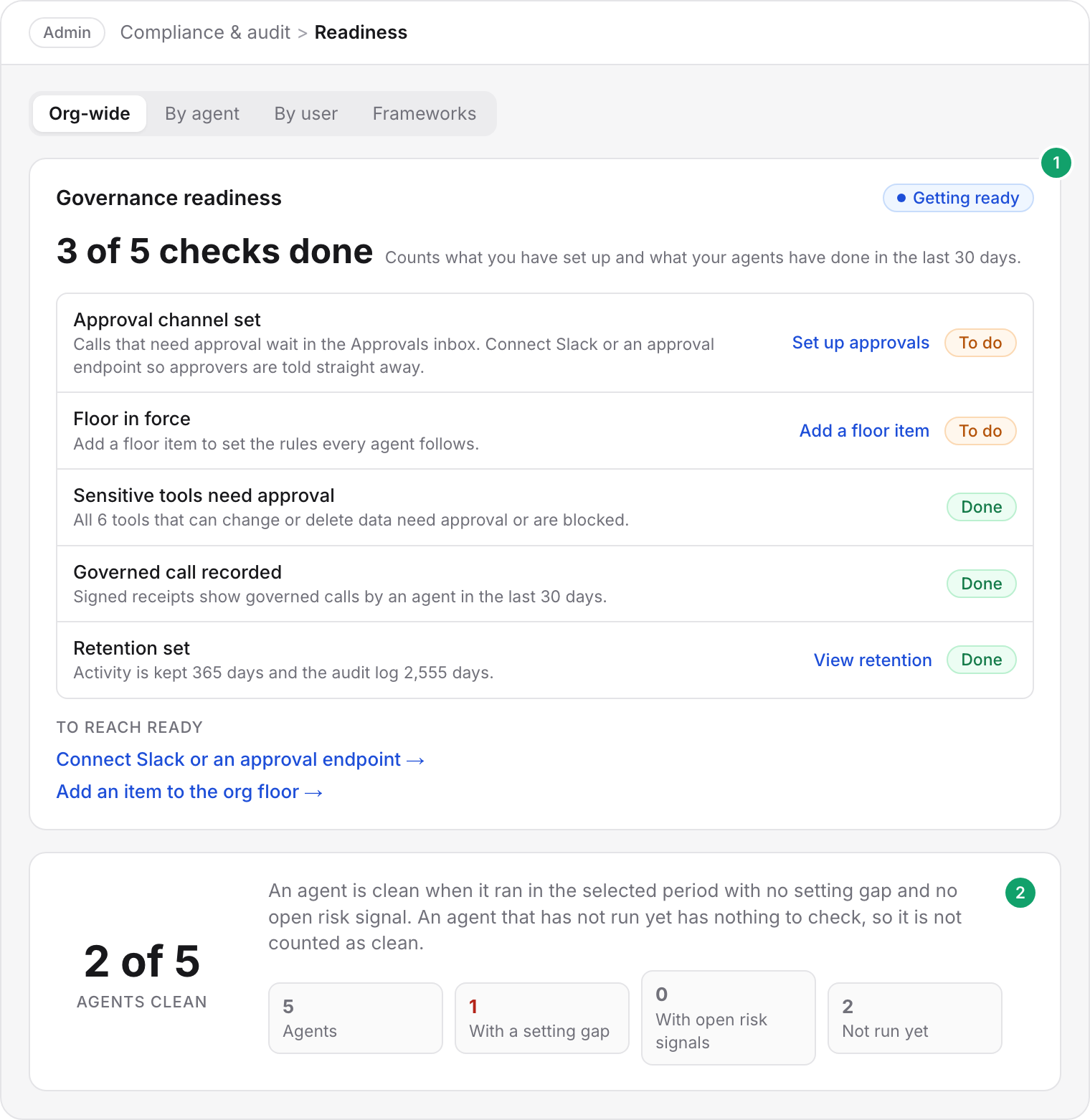
Readiness for a new organisation: two checks left before it reads Ready.
The card reads Ready only when every counted check is done and no risk signal is open. Otherwise it reads Getting ready (a check is left to do) or Needs attention (a risk signal is open), and To reach Ready links to each fix. A new organisation starts at Getting ready, never at 100%.
Prove it
Compliance & audit -> Readiness measures how well every agent is governed, organisation-wide, by agent, by user, and against frameworks such as SOC 2, ISO/IEC 42001, the EU AI Act, NIST AI RMF and the OWASP Top 10 for LLM applications. What to fix lists each gap with a button, such as Require approval or Review access, that takes you to the setting that closes it.
Readiness has four views: Org-wide, By agent, By user and Frameworks. Org-wide leads with the governance readiness card, then how many agents are clean, such as 2 of 5 agents clean, with how many have a setting gap, an open risk signal or have not run yet. An agent is clean when it ran in the period with no setting gap and no open risk signal; an agent that has not run yet is not counted as clean, and with no agents the count is 0%, never 100%. Each agent is assessed across eight dimensions: every action authorized, tamper-evident audit trail, cryptographic attribution, full activity telemetry, human approval on high-risk actions, least-privilege access, prompt-injection defense and sensitive-data protection. Four are guaranteed by the platform; the other four depend on your rules, your groups' toolkit decisions and tool overrides, and your Security settings. A destructive tool counts as gated when its toolkit decision asks first or blocks, or when a rule (org-wide or the group's) holds or blocks every call of it; a rule with an amount threshold holds only some calls, so it does not close the gap on its own. Readiness is connection-scoped: a gap only counts once you have connected the toolkit it applies to. A dimension with nothing to check reads Nothing to check yet. Who changed what links to the audit log, which records every governance change and who made it. Organisation health is on Overview; Risks & threats and Compliance & audit link to it.
Frameworks maps the dimensions to nine frameworks (SOC 2, ISO/IEC 42001, EU AI Act, NIST AI RMF, NIST AI 600-1, ISO/IEC 23894, OWASP Top 10 for LLM, GDPR and UK GDPR). Each card counts only the controls CortexHub runs on your agents, from your own agents' activity in the selected period, such as 9 of 9 agent controls evidenced by CortexHub, with Evidence since the first governed call in the period and chips for controls in place, on track, open and with no activity yet. A control with no activity in the period is never counted as met. The amber chip, such as 5 criteria your team owns: not checked here, counts the framework's organisational criteria, such as policies, training and contracts. Open a framework to see each control by the reference auditors use (for example SOC 2 CC6.1, EU AI Act Art. 12 or GDPR Art. 32), the criteria Owned by your team (for SOC 2, CC8.1 change management belongs to your own change process), and those Covered elsewhere in CortexHub. Readiness is a self-assessment, not a certification or an audit result. A daily check opens a risk signal when a watched framework's readiness regresses.
When an auditor or a customer asks how your AI is controlled:
- Open Compliance & audit -> Evidence packs and select Create evidence pack.
- Choose the Period and the Scope: organisation-wide, chosen agents, or one user. The pack keeps the calendar days you picked in your time zone: a pack picked from 18 October reads 18 October in its name, its file name and its manifest.
- Optionally choose a Framework (for example SOC 2), or start from Evidence for this framework on the framework's page.
- Download the pack when it is ready. It holds the signed records of allowed calls, the denials and holds, approvals (with any admin override and its reason), audit log, the policies in force, incidents, risk signals and the signed, hash-chained receipts with a chain-integrity report, as hashes and metadata rather than anyone's private content. Its manifest is signed, lists every file with its SHA-256, says what each file holds and how many rows it has, and the public signing key is published so the pack can be verified offline.
The policies in force (policies.ndjson) list everything that governed the period, each line with its kind and who set it: the org-wide rules and each group's rules (deleted ones too, with when each was in force), each with its sentence and its change history; every group's toolkit decisions, tool overrides and argument rules; then the policy versions published in the period. The pack's detail on Evidence packs says how many were in force and how many your team set, for example "41 in force: 5 set by your team, 36 CortexHub defaults" (the defaults are the starting decisions every group gets for the built-in toolkits), and how many lines are versions of policies already counted.
The pack's counts reconcile with each other, for example "Tool calls 22: 17 allowed (3 after approval), 4 denied, 1 waiting", "Receipts 21: one per finished call", "Denials and holds 8: 4 blocked, 4 held" and "Approvals 4: 3 approved, 1 waiting". The chain check reads, for example, "Chain intact: 38 records across 2 agents, no gaps".
A pack scoped to a framework also contains framework_index.json and framework_index.csv, listing each mapped control by reference, the evidence behind it and the files in the pack that hold it, plus the controls with no evidence in the period. Every file the index lists is in the pack; a file with no rows for the period is there and empty.
Verify a pack offline
Anyone can check a pack without CortexHub. The pack carries a signed manifest listing the
SHA-256 of every file, the agents' public keys and a README.md with the steps; the
CortexHub platform key is published at /.well-known/cortexhub-signing-keys.json.
pip install 'cortexhub[verify]'
cortexhub verify evidence-pack.zip
The verifier checks the manifest signature, every file, every signed record and every chain, and works air-gapped with a saved copy of the keys. The pack's detail on Evidence packs names the CortexHub public key that signed it by its fingerprint. See Verify receipts and evidence packs offline for the full steps, including how to check by hand.
Go deeper
- Guardrails and privacy: the runtime guardrails that pause agents.
- Sessions and activity: what a session trace shows.
Next
Forward For your team to your members, then work through Your setup checklist.