Step 2: Connect your systems
A toolkit is a system your agents can act in, such as Gmail, Slack, HubSpot, GitHub, Jira or Stripe, or your own service. Adding a toolkit to the organisation makes it available to govern. It does not give anyone access yet: that happens in Step 3, when a group is given the toolkit.
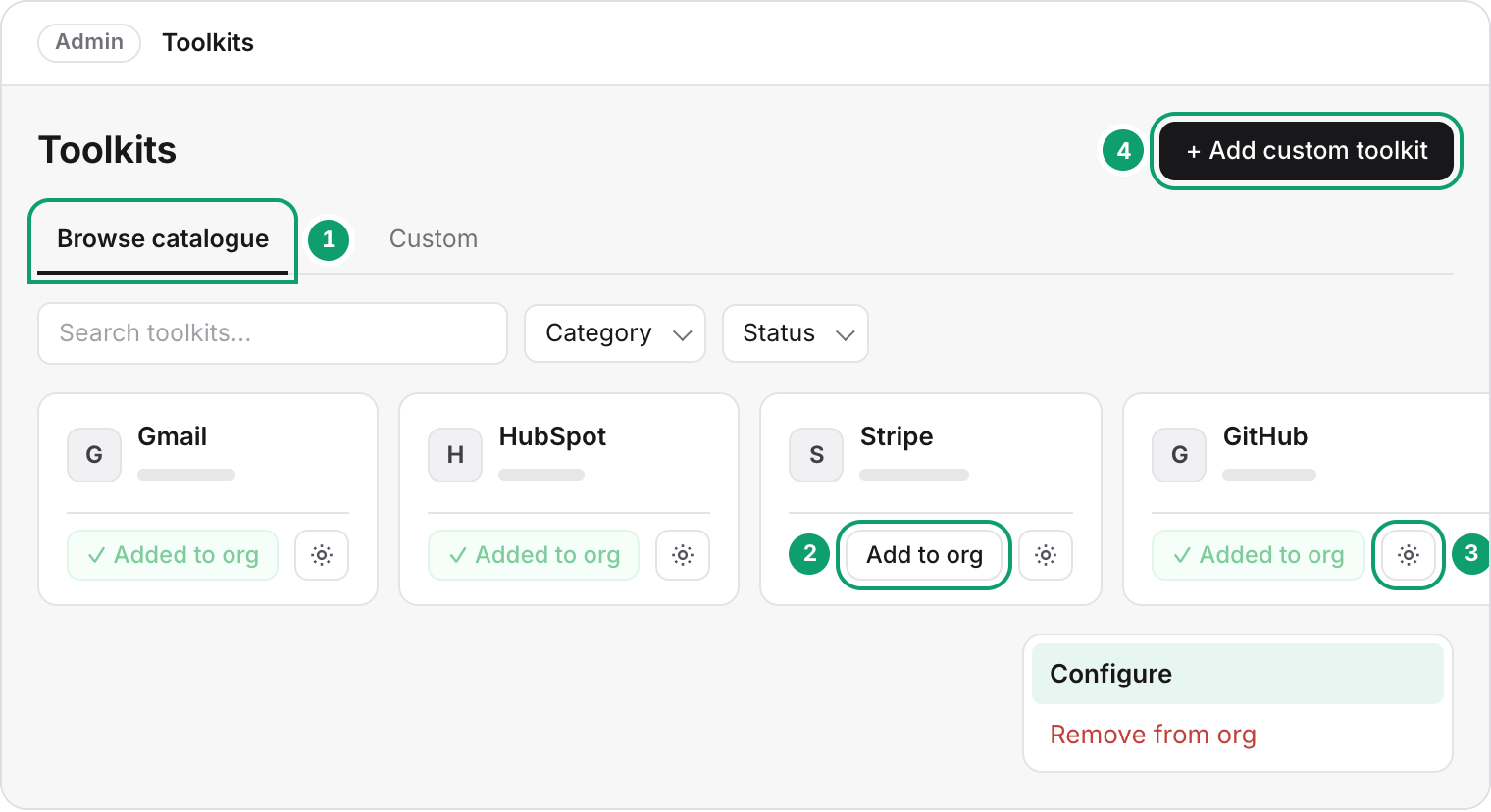
The toolkit catalogue. Adding a toolkit grants no access until a group is given it.
- Switch to Admin and open Toolkits, then the Browse catalogue tab.
- Find each system your first workflow needs and select Add to org.
- Open it from the gear on its card with Configure. For systems that use an API key or token, set a shared organisation credential there. Systems that use sign-in, such as Google, Slack and HubSpot, ask each member to sign in once with their own account.
- To connect your own service, select Add custom toolkit and choose MCP server (enter its URL, and probe it first if you like) or OpenAPI spec. For an OpenAPI spec, CortexHub picks the sign-in method the spec itself requires, such as an API key, and fills the Base URL from the spec; when the spec gives only a relative address, or none, enter the base URL yourself. Your own toolkits are listed first on Toolkits, under Your org's toolkits.
- To let agents use it straight away, select Choose who can use it on the toolkit's page. Pick the groups (All agents is preselected), check the starting decision for each kind of tool and who approves, such as "Write: Require approval, approved by org admins", and publish. A group that already has the toolkit shows Can use it; one with a set-up someone started shows Finish setting up. Customise rules opens the full set-up for one group instead.
On the toolkit's Auth tab, one setting holds the sign-in method, and an organisation credential set there is used by organisation agents and API-key agents. A member connects once, with nothing to enter, and their co-worker uses that credential unless the member enters their own key. Connect reads Needs credentials until the credential is set, and Needs a base URL until a custom toolkit has one.
When a toolkit arrives, CortexHub classifies every tool by what it does: whether it reads, writes or destroys data, and whether it moves money, sends something outside the company, touches personal, health, payment or secret data, or cannot be undone. Your rules in Step 3 match on those facts, so a new toolkit is covered as soon as it is added.
Every organisation also has CortexHub's own built-in toolkits, with nothing to connect, and every group gets them: Brain (memory), Files, Skills, Code execution, Media generation (images and video) and Brand kit. Web search is turned on per group, on the group's Web Access tab.
Credentials are encrypted and kept in a vault. When an agent acts, the gateway adds the credential to the call itself, so keys and tokens never reach a model, a chat or an agent's code.
Go deeper
- Toolkits and connections: connect methods, built-in toolkits, and how members connect once.
- Built-in tools: what each built-in toolkit does and how to control it.
- Tool access for your team: auth methods, OAuth scopes and custom toolkits.